Health checks#
The Health check page reads every server's certificates and configuration and lists what needs fixing, worst first. It runs the first time you open the page; click Run checks to run it again after a change.
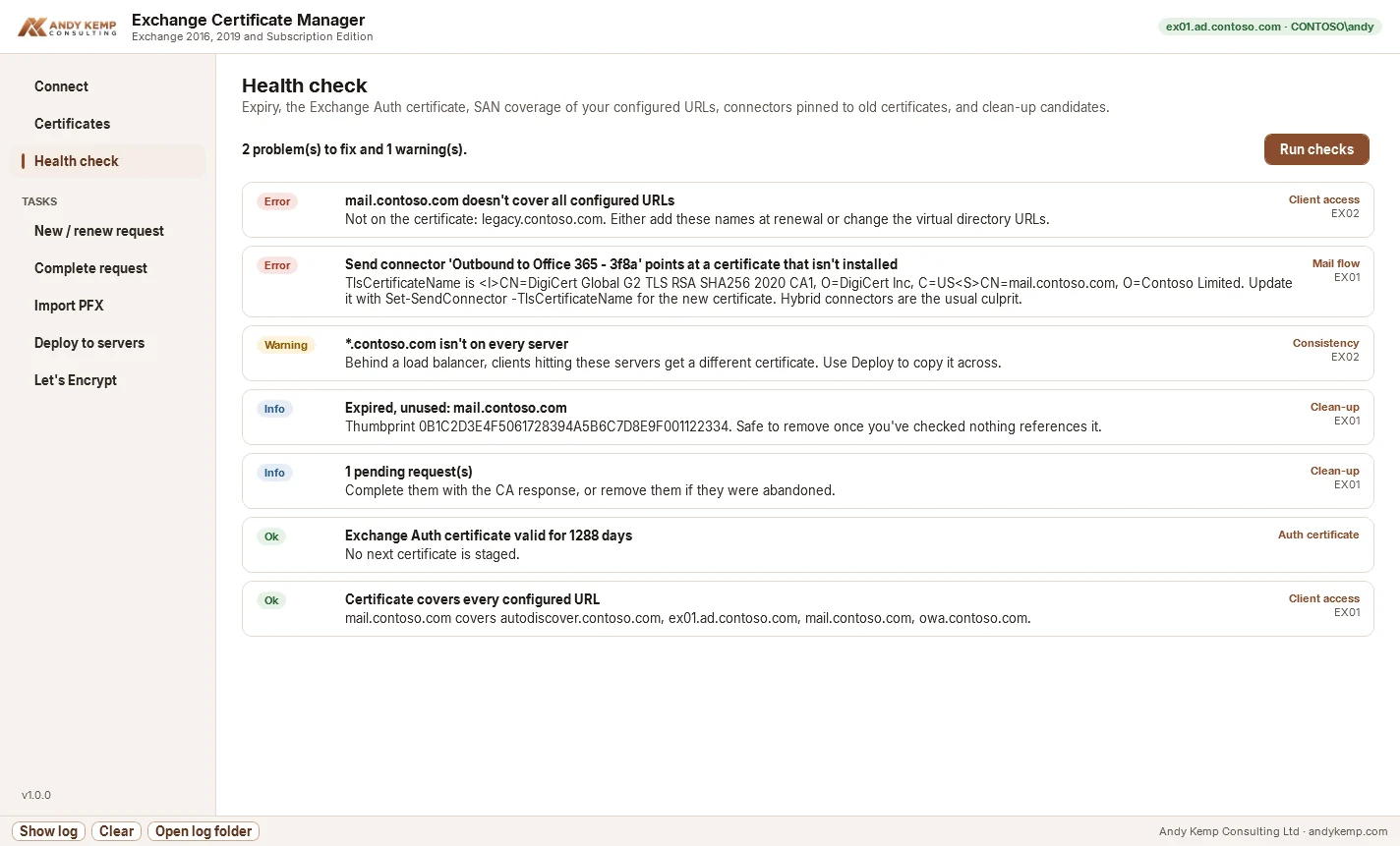
Each result has a severity:
| Severity | Means |
|---|---|
| Error | Something is broken now, or will break within 30 days |
| Warning | Worth fixing soon |
| Info | Tidy-up |
| Ok | Checked and fine |
Expiry#
Every CA-issued certificate that's in use (assigned to a service) is checked:
- Error: expired, or expiring within 30 days
- Warning: expiring within 60 days
Certificates that aren't assigned to anything aren't flagged here; expired unused ones appear under Clean-up.
Fix: renew it (select it on the Certificates page and click Renew…), complete the request and copy it to every server.
Auth certificate#
The Exchange Auth certificate (Microsoft Exchange Server Auth Certificate) signs OAuth tokens. Hybrid free/busy, OWA and ECP sign-in and server-to-server authentication depend on it, and when it expires those fail without much warning. The check reads Get-AuthConfig and reports:
- no Auth certificate configured
- the configured certificate isn't installed on any server, or is missing on some
- expired, or expiring within 60 days
- whether a next certificate is staged
Fix: if it's missing on some servers, use Deploy to servers with no services ticked. If it's expiring, follow Microsoft's Exchange Auth certificate renewal steps, then run the Hybrid Configuration Wizard again if you're hybrid.
Client access#
For each server, the app finds the CA-issued certificate assigned to IIS and checks that its names cover every hostname clients use:
- internal and external URLs of OWA, ECP, EWS, ActiveSync, OAB and MAPI
- Outlook Anywhere's internal and external hostnames
- the Autodiscover service connection point
A wildcard covers one level only: *.contoso.com covers mail.contoso.com but not mail.uk.contoso.com.
Fix: add the missing names at the next renewal, or change the virtual directory URLs to names the certificate already covers. If no CA-issued certificate is assigned to IIS at all, clients get certificate warnings: assign one.
Mail flow#
Receive connectors on each server, and send connectors, can name their certificate with TlsCertificateName in the form <I>issuer<S>subject. Hybrid connectors usually do. The check reports:
- Error: a connector names a certificate that isn't installed. TLS to Microsoft 365 or partners falls back or fails.
- Warning: a connector's certificate expires within 30 days.
Fix: after a renewal with a different issuer or subject, update the connector:
$c = Get-ExchangeCertificate -Thumbprint <new thumbprint>
$tls = "<I>$($c.Issuer)<S>$($c.Subject)"
Set-SendConnector "Outbound to Office 365 - <id>" -TlsCertificateName $tls
Set-ReceiveConnector "EX01\Default Frontend EX01" -TlsCertificateName $tls
Or re-run the Hybrid Configuration Wizard and choose the new certificate.
Consistency#
With more than one server, every CA-issued certificate in use should be on all of them. If it isn't, clients behind a load balancer get a different certificate depending on which server answers.
Fix: Deploy to servers.
Clean-up#
- Expired, unused certificates: expired and not assigned to anything. Safe to remove once you've checked nothing else references them.
- Pending requests: requests nobody completed. Complete them, or remove them from the Certificates page.