HAPMan#
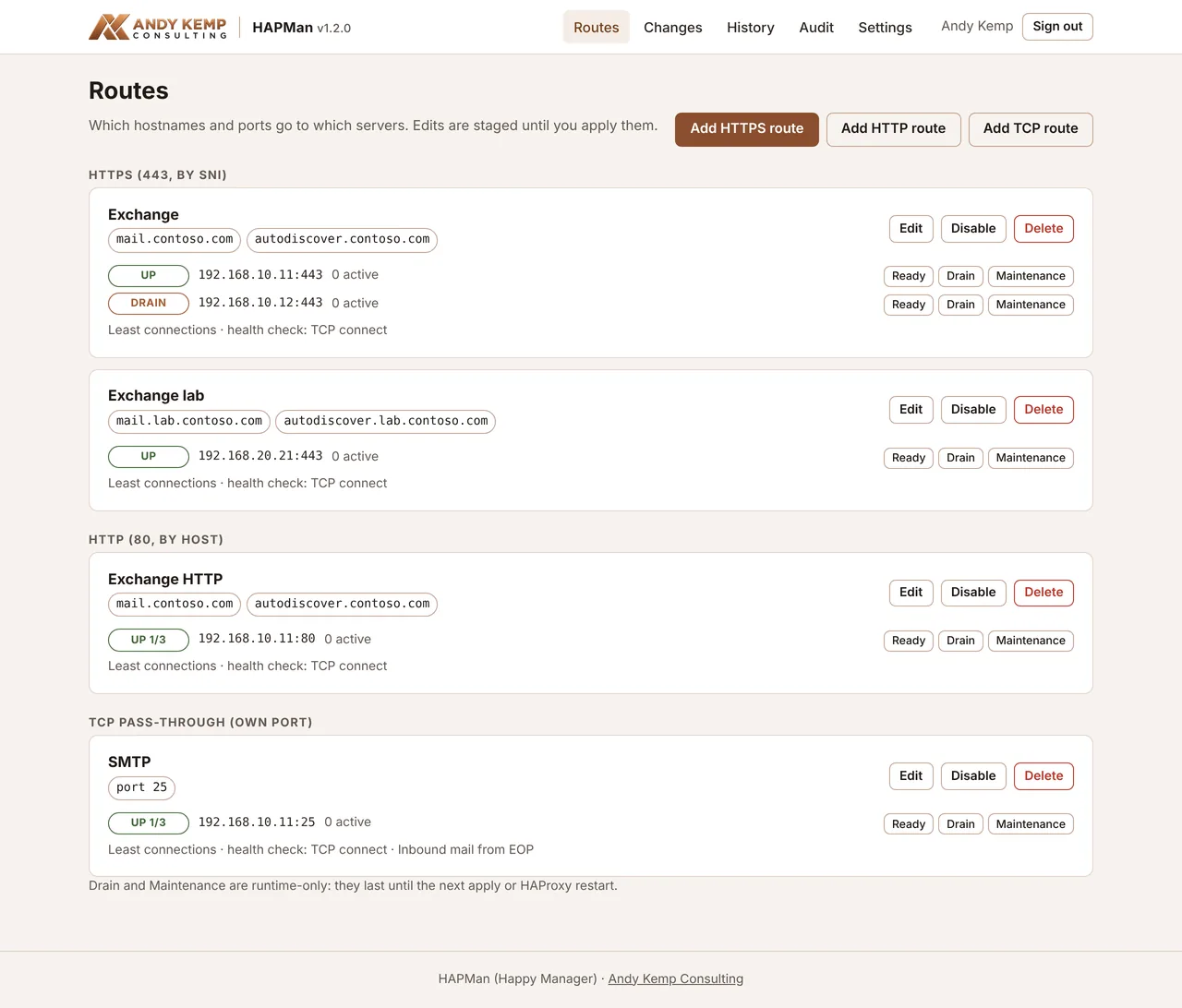
HAPMan (Happy Manager) is a free web admin for HAProxy on Ubuntu Server. It lets you run several servers behind one public IP address, sending each connection to the right server by its hostname, and you manage it from a small Entra ID-protected web page rather than by editing haproxy.cfg.
Tool page Download hapman.zip Download New-HAPManApp.ps1
See What's new for the latest changes.
Why it exists#
It was built for a home lab with two Exchange servers, prod on andykemp.com and a lab on andykemp.dev, and only one public IP on the router. Both need port 443. HAProxy can split port 443 by the hostname the client asks for, without touching the certificates, but editing its config by hand on every change is fiddly and easy to get wrong. HAPMan puts a safe, audited web page in front of it.
It works for anything that speaks TLS, HTTP or plain TCP, not just Exchange.
What it does#
- HTTPS routes (port 443), chosen by the SNI hostname and passed straight through. Nothing is decrypted, so certificates stay on the backend servers.
- HTTP routes (port 80), chosen by the
Hostheader: for example, Let's Encrypt HTTP-01 validation on a backend. Any other hostname can be redirected to HTTPS. - TCP routes (their own port): a whole port goes to one pool, such as 25 for SMTP. There's no hostname routing on these.
- Pools and health checks. More than one backend server on a route gives you load balancing. Health checks can be a TCP connect or an HTTP(S) page, such as Exchange's
/owa/healthcheck.htm. - Staged changes. Edits wait until you apply them. You see a diff first, HAProxy validates the config, the old config is backed up, and HAProxy reloads without dropping connections. A failed reload rolls back by itself.
- History and audit. Restore any applied version in one click. The audit log records sign-ins, edits, applies and server state changes.
- Live status, Drain and Maintenance. See each server's state and active sessions, and take one out of service while you patch it.
How it fits together#
Internet ─► public DNS ─► your public IP ─► router
            router forwards 443 (and 80, or other ports, as needed) ─► HAProxy VM
                                                    ├─ mail.contoso.com      ─► Exchange prod
                                                    └─ mail.lab.contoso.com  ─► Exchange lab
            router forwards 25 straight to Exchange prod (or add a TCP route)

LAN or Global Secure Access only ─► https://hapman.contoso.com:8443 ─► HAPMan (never port-forwarded)
HAProxy and HAPMan run on the same Ubuntu VM. HAProxy does the routing; HAPMan only writes its config and reads its status. If HAPMan or Entra ID is unavailable, HAProxy keeps running.
Security model#
- You sign in with Entra ID. Only people given the
HAPMan.Adminapp role can sign in (the enterprise app has Assignment required on). Sessions last 8 hours. - HAPMan runs as an unprivileged
hapmanservice account. Its only root access is one sudo rule for/usr/local/sbin/hapman-apply, which takes no arguments. That helper copies the staged config somewhere only root can write, checks it's a HAPMan config, runshaproxy -c, backs up the live config, installs the new one and reloads HAProxy. - Live status, Drain and Maintenance go through HAProxy's admin socket, which
hapmanreaches through thehaproxygroup. - HAPMan's own web page is on port 8443 with a Let's Encrypt certificate. It's for your internal network only: never port-forward it.
The pages#
| Page | What it's for |
|---|---|
| Routes | Every route, its servers, their live status, and Drain, Maintenance and Ready |
| Changes | The diff against the live config, validation, and Apply |
| History | Every applied version, with a one-click restore |
| Audit | Who signed in and changed what, newest first |
| Settings | Listen address, the HTTP-to-HTTPS redirect, and timeouts |
Quick links#
- Requirements: the VM, DNS name, Cloudflare token and Entra roles
- Install: the Entra app from Windows or Mac, then the Ubuntu installer
- Using HAPMan: routes, health checks, applying, history and patching
- Worked example: two Exchange servers behind one IP
- Operations: updates, the Entra secret, break-glass and backups
- Troubleshooting: status, apply, setup code and sign-in problems