Using HAPMan#
Everything you change in HAPMan is staged: it's saved, but nothing reaches HAProxy until you review it on the Changes page and click Apply. While there are staged changes, Changes in the menu shows a dot.
Routes#
The Routes page lists every route, grouped by type, with each backend server's live status and active sessions.
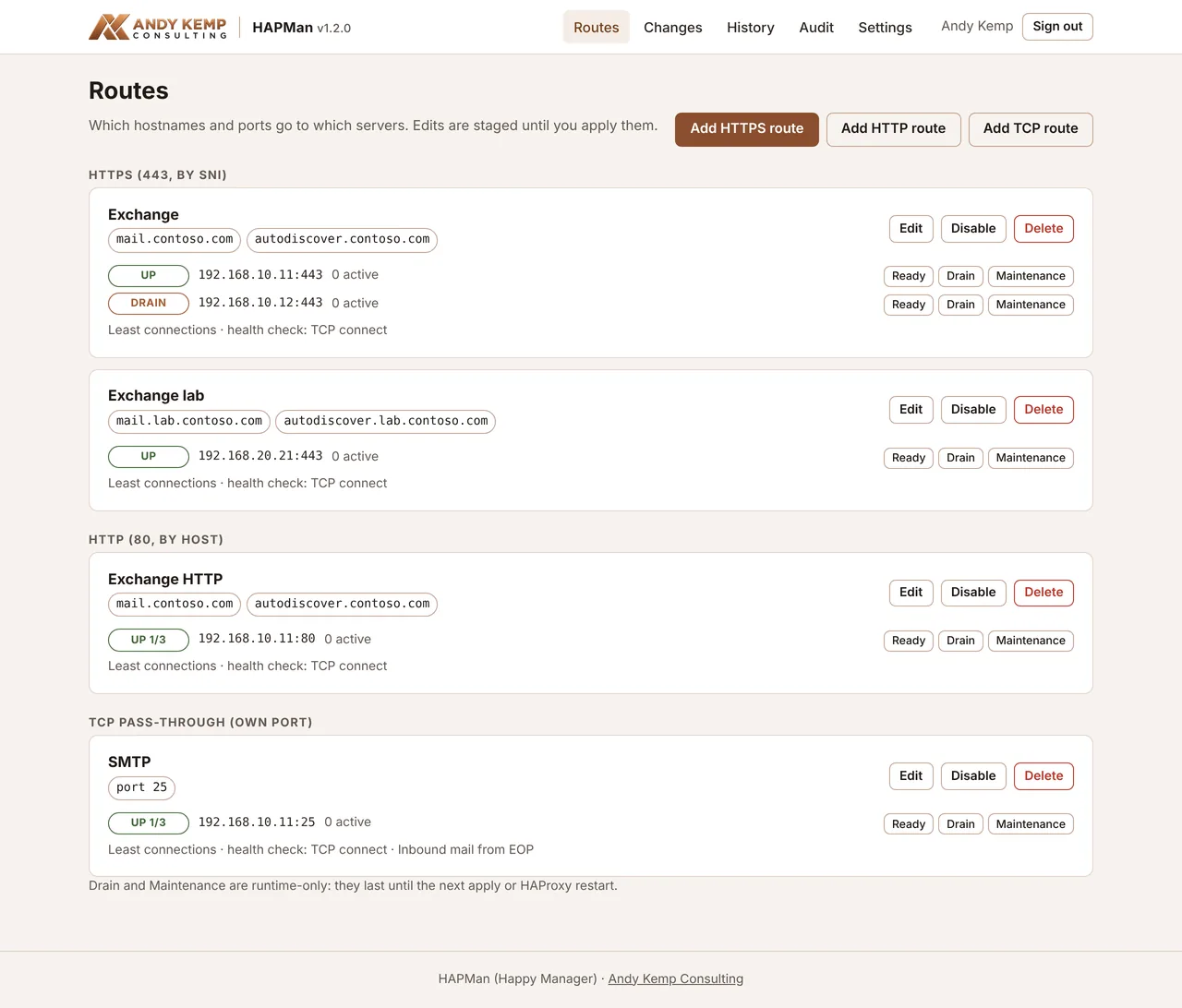
Add a route with Add HTTPS route, Add HTTP route or Add TCP route. Each route can be edited, disabled (kept, but left out of the config) or deleted.
Route types#
| Type | Listens on | Chooses the route by | Use it for |
|---|---|---|---|
| HTTPS | 443 | The SNI hostname in the TLS handshake | Web servers, Exchange, anything on 443. TLS is passed straight through, so the certificate stays on the backend. |
| HTTP | 80 | The Host header |
Let's Encrypt HTTP-01 validation on a backend, HTTP-to-HTTPS redirects done by the backend, simple web apps |
| TCP | Its own port | Nothing: the whole port goes to one pool | SMTP on 25, or any other single-purpose port |
Because HTTPS routes don't decrypt anything, HAProxy never holds your backend certificates, and each backend sees a normal TLS connection. The catch is that the backend sees connections coming from the HAProxy VM rather than the real client IP.
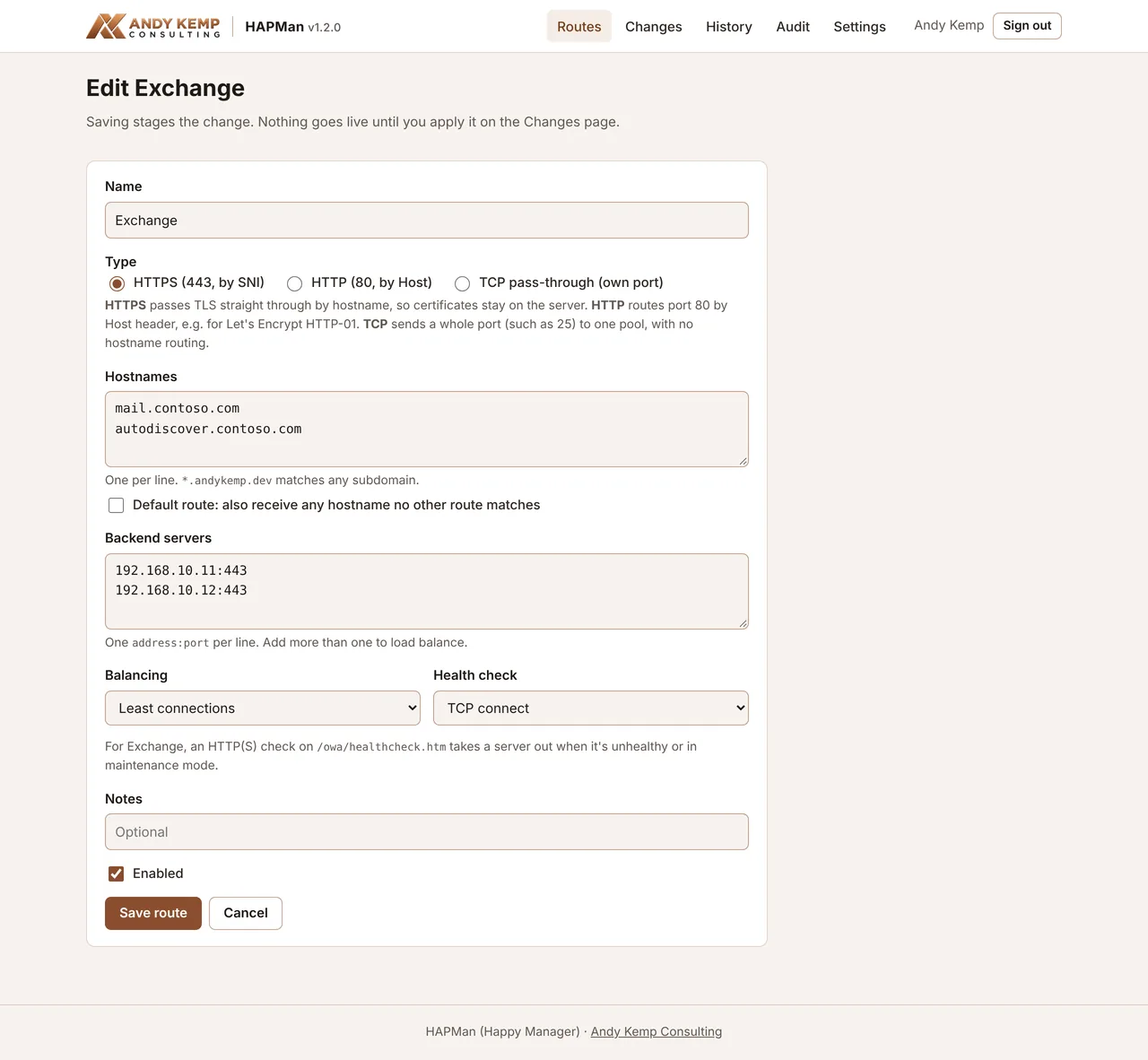
Route settings#
| Setting | Notes |
|---|---|
| Name | Up to 48 characters. Must be unique. |
| Hostnames | One per line (HTTPS and HTTP only). *.contoso.com matches any subdomain. A hostname can only be on one route of each type. |
| Default route | Also receive any hostname that no other route matches. Without a default, HTTPS connections for unknown names are closed. |
| Listen port | TCP only. Not 80 or 443 (use HTTP and HTTPS routes), not a reserved port (22 and HAPMan's own), and only one TCP route per port. |
| Backend servers | One address:port per line, such as 192.168.10.11:443, ex01.contoso.local:443 or [fd00::11]:443. Up to 16. |
| Balancing | Least connections (the default), Round robin, or Source IP (sticky), which keeps each client on the same server |
| Health check | None, TCP connect, or HTTP(S) page with a path |
| Notes | Shown on the Routes page |
| Enabled | Untick to keep the route but leave it out of the config |
Pools and health checks#
Put more than one backend server on a route and HAProxy shares connections between them, using the balancing method you chose. Health checks decide which servers get traffic:
- TCP connect checks the port answers. Every 10 seconds; 3 failures mark a server down, 2 successes mark it up again.
- HTTP(S) page requests a path and expects HTTP 200. On an HTTPS route the check uses TLS, sends the route's first hostname as the SNI and
Hostheader, and doesn't verify the certificate. Same timings as TCP. - None sends traffic whether the server is up or not.
Exchange#
For Exchange, use an HTTP(S) page check on:
Exchange returns 200 from that page only when OWA is healthy, and stops when you put the server into maintenance mode (by setting the OWA proxy component to inactive). So HAProxy takes a server out automatically when Exchange is unhealthy or being patched, without you touching HAPMan.
Server status#
Each server shows a status pill. Hover over it to see the last check result.
| Status | Meaning |
|---|---|
| UP | Passing health checks and taking traffic. UP 1/3 means it's coming back up and has passed 1 of the checks it needs. |
| DOWN | Failing health checks, so no new traffic. See Troubleshooting. |
| NO CHECK | No health check on this route, so it always takes traffic |
| DRAIN | No new connections; existing ones carry on |
| MAINT | Out of service |
| not live | HAProxy doesn't have this server yet: the route hasn't been applied, or HAProxy has only just reloaded |
Changes: review and apply#
The Changes page shows exactly what will change in /etc/haproxy/haproxy.cfg:
- Validation: HAProxy checks the full config (
haproxy -c) before you can apply it. - Differences from the live config: a unified diff, live against pending.
- Change note: optional, shown in History and the audit log.
- Full generated config: expand it to see the whole file.
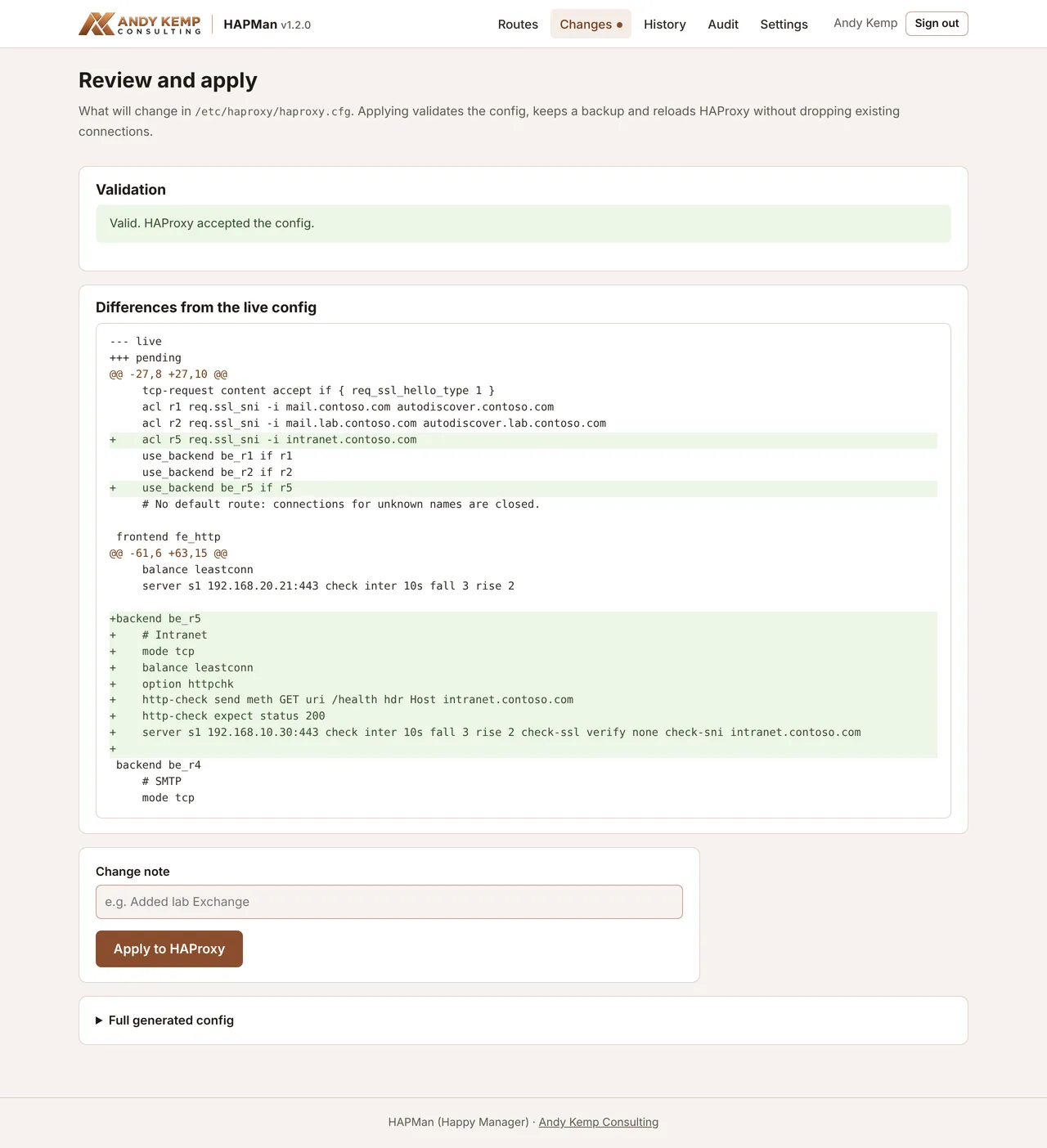
Click Apply to HAProxy. HAPMan then:
- validates the config again,
- hands it to the apply helper, which validates it as root, backs up the live config to
haproxy.cfg.hapman-prevand installs the new one, - reloads HAProxy, so existing connections aren't dropped,
- records a new version in History and an entry in the audit log.
If HAProxy rejects the config or the reload fails, the previous config is put back, the live config doesn't change, and the error is shown. The audit log records it as apply-rejected or apply-failed.
Note
HAPMan owns haproxy.cfg. Anything you edit there by hand shows up as a difference on the Changes page, and the next apply overwrites it. See Break-glass.
History#
Every config HAPMan has applied, newest first, with who applied it and the change note. The top one is marked live.
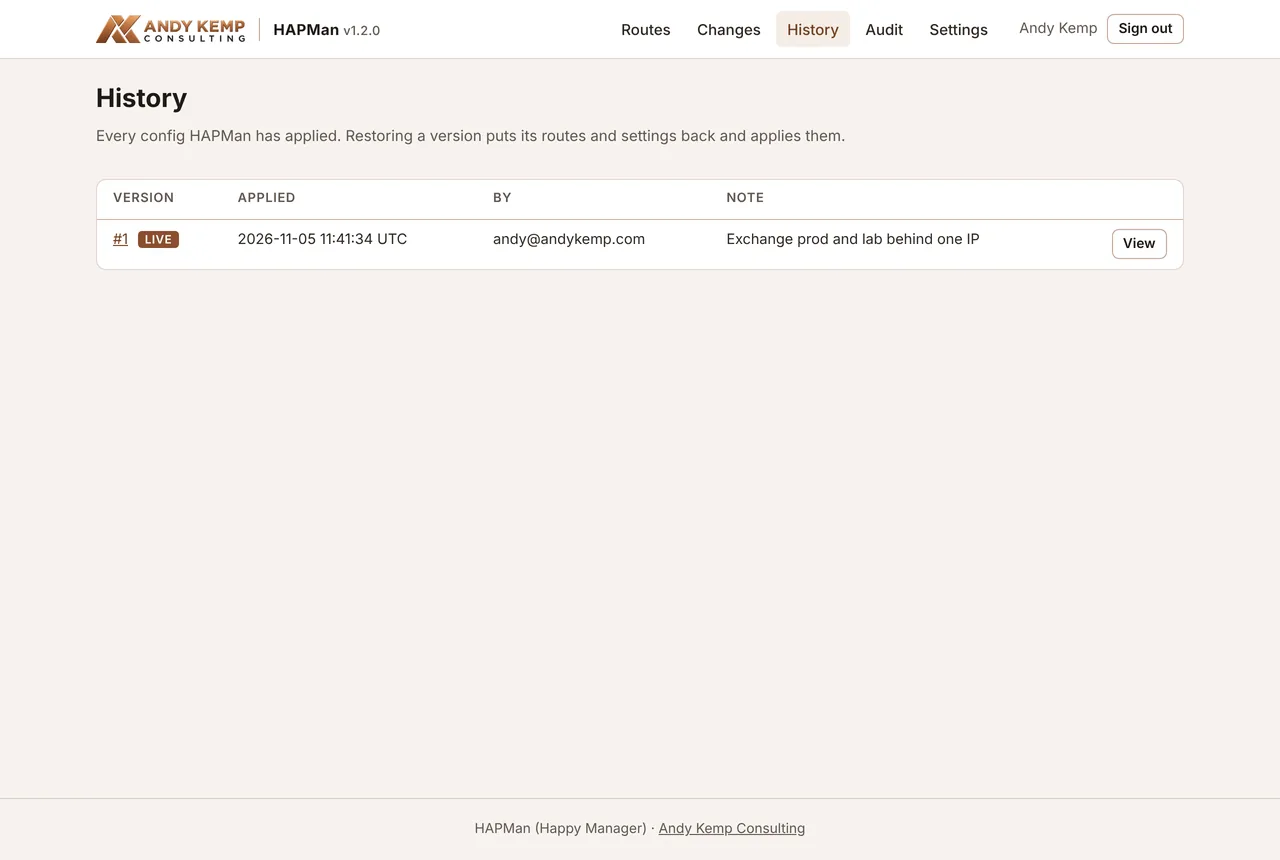
Click View to see a version's config and its diff against the live config. Restore puts that version's routes and settings back and applies them straight away, as a new version. If the restore can't be applied, nothing changes.
Audit#
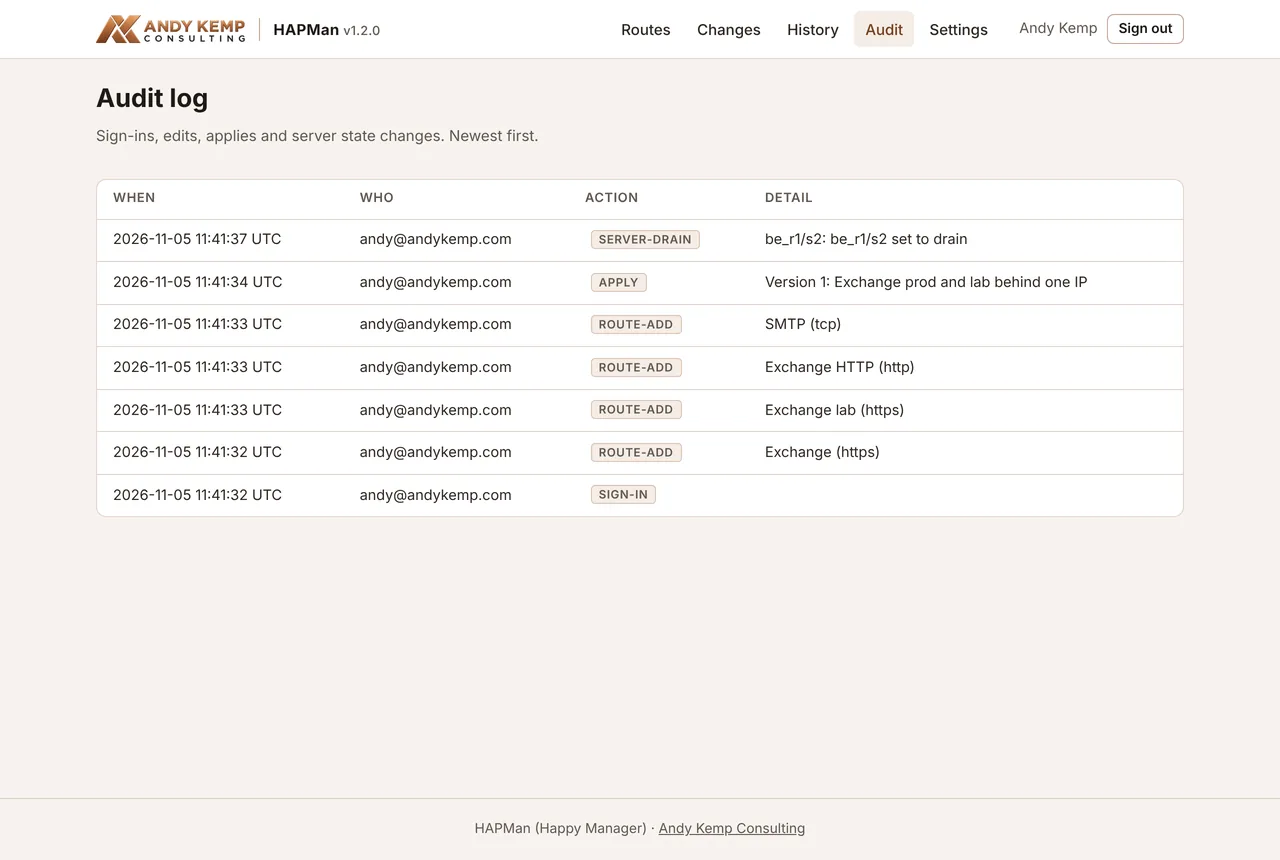
Every sign-in, denied sign-in, route change, settings change, apply (including rejected and failed ones), restore and server state change, with who, when and the detail. Newest first.
Settings#
Listener-wide options, staged like route changes:
| Setting | Default | Notes |
|---|---|---|
| Listen address | * |
Every address. Enter one IPv4 address to keep HAProxy off other interfaces. |
| Redirect to HTTPS | On | On port 80, redirect any hostname without an HTTP route to HTTPS. This makes HAProxy listen on 80 even with no HTTP routes. Ignored if an HTTP route is the default. |
| Connect timeout | 5s |
How long to wait for a backend to accept a connection |
| Idle connection timeout | 1h |
Keep at 1h for Outlook and ActiveSync, which hold connections open |
| HTTP client timeout | 30s |
For HTTP routes |
Below them, Server configuration shows read-only values from /etc/hapman/hapman.env: the tenant, when the client secret expires, the required app role, any allow-list, the HAProxy paths and the reserved ports.
Drain and Maintenance#
Each server on the Routes page has Ready, Drain and Maintenance buttons. They take effect immediately through HAProxy's admin socket; there's nothing to apply.
To patch a server:
- Click Drain on it. New connections go to the other servers in the pool; existing ones carry on.
- Wait for its active sessions to reach 0 (refresh the page).
- Patch and restart it.
- Click Ready.
Maintenance takes a server out straight away, cutting its existing connections.
Drain and Maintenance are runtime-only: they're reset by the next apply or HAProxy restart. To keep a server out for longer, remove it from the route and apply.
Tip
With the Exchange health check, putting Exchange into maintenance mode takes the server out of HAProxy too. Drain first if you want sessions to finish gracefully.